> For the complete documentation index, see [llms.txt](https://help.travelledger.org/llms.txt). Markdown versions of documentation pages are available by appending `.md` to page URLs; this page is available as [Markdown](https://help.travelledger.org/tl-pay-virtual-cards-vccs.md).

# TL Pay Virtual Cards (VCCs)

An overview of virtual cards (VCCs) in Travel Ledger

### Overview

**Who this is for:** Buyers who want to pay suppliers by card from their TL Pay account.

TL Pay Virtual Cards (VCCs) are virtual cards issued instantly from your TL Pay account, powered by Adyen and built specifically for <mark style="color:purple;">**B2B travel businesses**</mark>.&#x20;

They extend TL Pay beyond the Travel Ledger settlement network: use them to pay **suppliers outside Travel Ledger** - hotels, bedbanks, any supplier that accepts card payments, plus selected integrated suppliers such as Expedia TAAP, while maintaining full visibility, reconciliation and control within Travel Ledger.

<details>

<summary><mark style="color:purple;"><strong>What are TL Pay Virtual Cards?</strong></mark></summary>

TL Pay Virtual Cards enable you to:

* Issue virtual cards directly in Travel Ledger
* Pay suppliers that are <mark style="color:purple;">**not on the Travel Ledger network**</mark>
* Automatically reconcile card payments where supplier data is available
* Improve cashflow by funding payments only when charges are due to occur

</details>

<details>

<summary><mark style="color:purple;"><strong>What TL Pay Virtual cards are for (and aren't!)</strong></mark></summary>

#### Virtual cards are used for:

* Off-platform suppliers
* Integrated card only suppliers (e.g. Expedia TAAP)

#### Virtual cards are not used for:

* Travel Ledger → Travel Ledger supplier payments\
  (These continue via TL Pay bank settlement)

{% hint style="info" %}
**Payments to suppliers already on Travel Ledger continue via standard TL Pay bank settlement and are not affected by virtual cards.**
{% endhint %}

</details>

<details>

<summary><mark style="color:purple;"><strong>Key Benefits - why use virtual cards?</strong></mark></summary>

* **Improved cashflow - no pre-funding - cards are funded just in time.** Creating a card does not use funds from your account. Funds are needed only when the supplier actually charges the card. Your cash remains available in the meantime; your job is simply to have the balance available by the charge date. → [Managing your exposure](/tl-pay-virtual-cards-vccs/funding-and-exposure.md)
* **Everything reconciles in one place.** For integrated suppliers (such as Expedia TAAP), booking and payment data flows into Travel Ledger automatically and is matched for you. For all other suppliers, the card carries the booking references you enter at creation, so every charge lands with its context attached. → [Reconciling card spend](/tl-pay-virtual-cards-vccs/reconciling-virtual-cards.md)
* **Cashback on card spend.** You earn cashback at 50% of the card’s interchange rate (1% at the default 2% interchange), paid monthly. → [Cashback programme](/tl-pay-virtual-cards-vccs/incentive.md)
* **Two card types for different jobs.** Single-use cards for a specific booking with a fixed amount; multi-use cards for recurring payments, lodge cards or a homeworker’s bookings. → [Creating virtual cards](/tl-pay-virtual-cards-vccs/creating-tl-pay-virtual-cards.md)

</details>

#### Accounts and cards: two dashboards

TL Pay separates account management from card management across two dashboards. This section covers the Virtual Cards side:

<table><thead><tr><th width="174">Screen</th><th width="185">What it manages</th><th>Typical tasks</th></tr></thead><tbody><tr><td><a href="/tl-pay-account/tl-pay-dashboard.md">TL Pay Dashboard</a></td><td>Your accounts and your funds</td><td>Check balances, fund an account, withdraw, move funds between accounts, create sub-accounts, rename accounts</td></tr><tr><td>TL Pay Virtual Cards</td><td>The cards issued from each account</td><td>Create cards, track charges, edit or block cards, view logs, raise disputes, export card statements, monitor exposure</td></tr></tbody></table>

### Getting set up <a href="#getting-set-up" id="getting-set-up"></a>

1. [Open a TL Pay account](/tl-pay-virtual-cards-vccs/applying-for-an-adyen-account.md) (Adyen) if you do not yet have one.
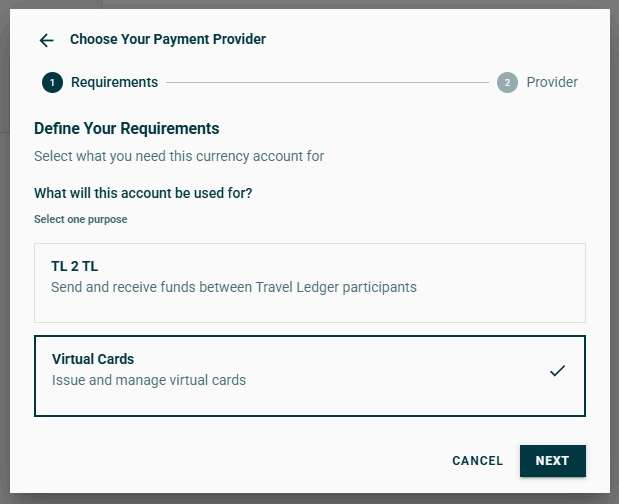
2. Enable Virtual Cards: on the TL Pay Accounts Dashboard, select **+ Add new payment method**, choose **Virtual Cards** as the account purpose and complete the activation steps.

<figure><img src="https://3714949765-files.gitbook.io/~/files/v0/b/gitbook-x-prod.appspot.com/o/spaces%2F-MacUE666EkqnejMK9CH%2Fuploads%2FZDuAgtBR6Zb98PX1q8Vq%2Fimage.png?alt=media&amp;token=31bae066-8901-46f2-a3fa-14d62513d191" alt=""><figcaption><p>The TL Pay Accounts Dashboard - Add new payment method</p></figcaption></figure>

<figure><img src="https://3714949765-files.gitbook.io/~/files/v0/b/gitbook-x-prod.appspot.com/o/spaces%2F-MacUE666EkqnejMK9CH%2Fuploads%2FZp9cyVHDGwiZErmnkeuq%2Fimage.png?alt=media&amp;token=1739466f-f444-49ee-b67d-8d99bfb8bc59" alt="" width="310"><figcaption><p>Choose Virtual Card as the account purpose</p></figcaption></figure>

3. [Create your first card](/tl-pay-virtual-cards-vccs/creating-tl-pay-virtual-cards.md)

#### More Information and Virtual Cards in Practice

For more information on virtual cards and for activating and using cards, please see the pages below:

{% content-ref url="/pages/ONqO5ImiCaf5I1TQ620v" %}
[Applying for an Adyen Account](/tl-pay-virtual-cards-vccs/applying-for-an-adyen-account.md)
{% endcontent-ref %}

{% content-ref url="/pages/dwWoHncb66976ROfub1b" %}
[Creating TL Pay Virtual Cards](/tl-pay-virtual-cards-vccs/creating-tl-pay-virtual-cards.md)
{% endcontent-ref %}

{% content-ref url="/pages/BstLnjS32gbJpwb0wYaT" %}
[Editing and managing Virtual Cards](/tl-pay-virtual-cards-vccs/editing-and-managing-virtual-cards.md)
{% endcontent-ref %}

{% content-ref url="/pages/dafKQLuk6F5iZUh9cWsJ" %}
[Funding and Exposure](/tl-pay-virtual-cards-vccs/funding-and-exposure.md)
{% endcontent-ref %}

{% content-ref url="/pages/kx8uGgbRUujPE4Ikrhsd" %}
[Reconciling Virtual Cards](/tl-pay-virtual-cards-vccs/reconciling-virtual-cards.md)
{% endcontent-ref %}

{% content-ref url="/pages/yxVUNfyPkFategg2wlXx" %}
[Incentive](/tl-pay-virtual-cards-vccs/incentive.md)
{% endcontent-ref %}